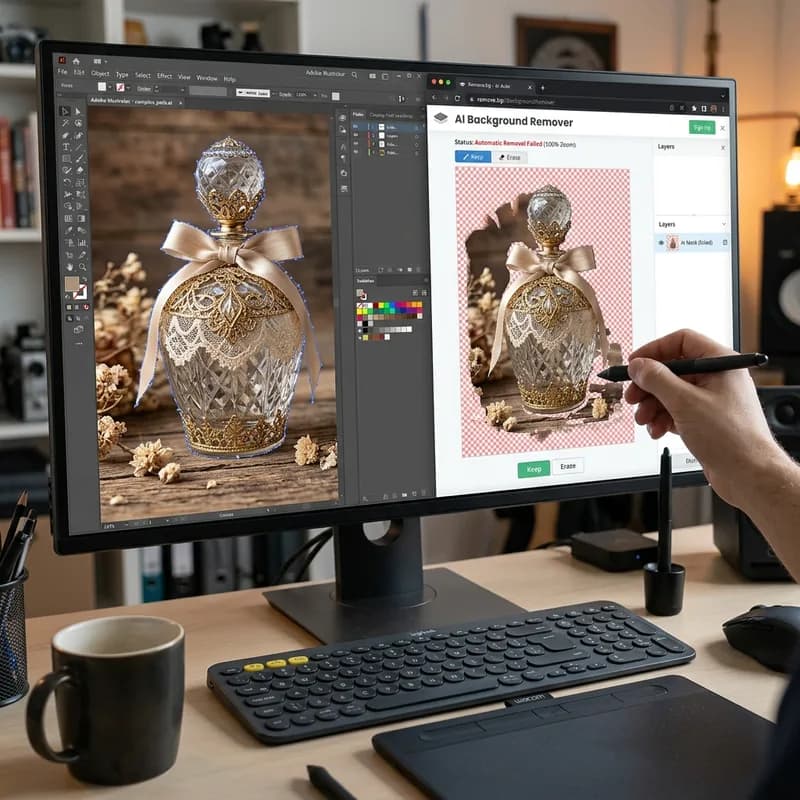
Background removal is the goal. Clipping path is one way to achieve it — and not always the right one. Here’s exactly which technique your products need and why getting it wrong costs you conversions.
When e-commerce sellers say “remove the background,” they mean one thing. When a professional photo editor hears that, they think about three possible techniques — and which one they choose determines whether your final image looks crisp and clean or slightly off in ways that quietly kill conversions. Clipping path and background removal are not the same thing. One is a goal; the other is a method.
Background Removal Is the Goal, Not the Technique
Background removal describes the end result: a product isolated against a transparent or solid-colour background. How you get there is a separate decision entirely. There are three main techniques for achieving it, and they produce different quality outputs for different types of products.
What Is a Clipping Path?
A clipping path is a closed vector path drawn manually around an object using Photoshop’s Pen Tool. The path defines exactly where the object ends and the background begins. When saved as part of the file, it acts as a mask: anything inside the path stays, anything outside is removed.
The Pen Tool produces mathematically defined Bezier curves that follow hard, well-defined edges exactly. This gives clipping paths two characteristics that matter for e-commerce photography:
- Mathematically precise edges: The path is defined by points and curves, not pixels. Scaling the image up or changing the background never introduces edge artifacts.
- Requires hard, well-defined edges: The Pen Tool excels at objects where there is a clear, sharp boundary between subject and background. It fails on edges that are soft, fuzzy, or transparent.
A clipping path on a leather handbag takes 3–8 minutes depending on shape complexity. A clipping path on a fur-trimmed jacket is impractical — the edge detail that makes the fur look realistic cannot be captured with a vector path. That’s where masking takes over.
The number of anchor points required to trace an object determines processing time and pricing tier. A simple water bottle might need 15–20 points. A complex sneaker with lacing, textured panels, and multiple curves requires 80–120 points. This relationship between complexity and anchor-point count is why professional editors price clipping paths as "basic," "medium," or "complex" rather than flat-rate — the technique is the same, but the time investment scales with shape.
What Is Image Masking?
Image masking uses Photoshop’s alpha channel capabilities — not vector paths — to separate a subject from its background. Instead of defining a hard mathematical edge, a mask assigns transparency values to individual pixels. This allows gradual transitions: a pixel can be 100% opaque at the product surface and 0% opaque at the background, with a gradient of partial transparency at the edge.
This is the only way to preserve soft detail that a vector path would simply cut off. There are several masking techniques used in professional product retouching:
- Layer masking — manual brush-based masking at pixel level, used for most soft-edge product shots
- Alpha channel masking — uses the image’s own luminance and colour channel data to build a high-precision mask, used for semi-transparent products (glass, gemstones, sheer fabric)
- Colour range selection with refinement — builds a selection from colour data and refines edges, used for products shot against a consistent-colour background
What Is AI Background Removal?
AI background removal tools — remove.bg, Adobe’s Remove Background, Canva’s background eraser — use machine learning models to automatically detect and separate subject from background. They work by recognising shapes, depth cues, and colour contrast patterns trained on millions of product images.
AI tools produce usable results in seconds on simple, high-contrast products. They struggle systematically on:
- Transparent or semi-transparent products (glass, gemstones, clear packaging)
- Fine detail at sub-pixel scale (fine chain jewellery, fabric texture at macro)
- Products whose colour closely matches the background
- Complex topology with interior negative spaces (interlocking rings, open-weave baskets)
For a full breakdown of where AI fails on jewellery specifically, see Why AI Background Removal Fails on Jewelry.
When Products Need Both Techniques
Jewellery is the most common example of a product that requires both clipping path and alpha masking. The hard outer contour — the body of a ring or the frame of a pendant — is defined with a Pen Tool clipping path. The transparent areas inside — gemstones, the gaps between chain links, engraved recesses — require alpha channel masking to preserve their translucency correctly. The finished result combines the mathematically precise outer edge of a vector path with the natural transparency handling of a pixel mask.
This is why jewellery background removal costs more than simple products — not because of labour hours alone, but because two entirely different techniques must be applied to a single image, with each covering a different zone of the product. An editor who applies only a clipping path will cut through the gemstones rather than letting them render as transparent. An editor who uses only masking on the outer edge will produce a slightly soft boundary that looks acceptable at thumbnail scale but fails at full-resolution inspection.
Which Technique for Which Product?
The right choice depends on what the product’s edges look like, not what the product category is. Here’s how to match technique to product type:
| Product Type |
Edge Character |
Technique |
| Handbags, shoes, electronics, bottles |
Hard, defined edges |
Clipping path |
| Apparel, folded fabric, towels |
Soft fabric edges |
Layer masking |
| Jewellery, fine chains |
Hard body + reflective surfaces + sub-pixel detail |
Clipping path + alpha masking |
| Glass, transparent packaging |
Semi-transparent edges and surfaces |
Alpha channel masking |
| Fur, hair, feathers |
Soft, fine strands at edges |
Alpha masking + refine edge |
| Simple hard goods (cups, tools, books) |
Clean hard edges, low complexity |
AI + manual refinement or basic clipping path |
How to Brief Your Editor Correctly
Most background removal quality issues come from a mismatch between what the client asked for and what the editor executed. Using the right terminology in your brief prevents this:
Ask for a clipping path when your product has hard, sharp edges and you need mathematically clean isolation. Say: “Manual clipping path, hard edge, Pen Tool only.” This tells the editor not to use AI or automated selection tools.
Ask for masking when your product has soft edges, fine detail, or transparent areas. Say: “Alpha channel masking, preserve soft edges” or “Refine edge masking for fabric” depending on the product type. Most studios categorise jobs as “basic clipping path,” “complex clipping path,” or “masking” — and price accordingly.
Specify the output format: If you need the path embedded in the file for use in InDesign or a print workflow, ask for “clipping path saved in TIFF or PSD.” If you need a transparent background for web use, ask for “PNG with transparent background.” These are different deliverables and require different file handling.
Quality Signals: How to Check the Work
When reviewing background removal work, zoom to 200% at the product edge and check for:
- Halo effect — a faint fringe of the original background colour remaining around the edge. Indicates the mask was not refined close enough to the actual edge, or a soft AI selection was used where a hard clipping path was needed.
- Notched or jagged edges — pixelated stairstepping along curved edges. Indicates a raster selection tool was used instead of the Pen Tool on a product that needed a vector clipping path.
- Missing detail — fine strands, chains, or fabric weave cut off at the edge. Indicates a clipping path was used where masking was required.
- Filled interior gaps — negative space within the product (e.g., the space inside a ring, the hole in a belt buckle) incorrectly filled. Indicates the editor used fill-detect rather than manually defining each interior path.
A clean isolation looks invisible — the eye does not notice the edge at all. Any edge artifact that draws your attention means the technique choice or the execution was wrong. A reliable test: place the isolated product against a dark solid colour — navy or charcoal — zoom to 200%, and examine the full perimeter. Halo, fringing, jagged edges, and missing detail all become immediately visible against a dark background in a way they might not be on white. This dark-background check is standard practice in professional production workflows before any image is approved for upload. Defects caught at this stage cost nothing to correct. Defects discovered after a batch of 500 images has been uploaded to a marketplace cost the time, rank history, and customer trust that were lost while the bad images were live.
Pricing by Technique
- AI background removal: $0.10–0.29/image — fast, suitable only for simple hard-edge products at high volume
- Basic clipping path (simple shape): $0.29–0.59/image — clear hard edges, minimal curves
- Complex clipping path (detailed shape): $0.59–1.20/image — many curves, holes, or intricate structure
- Masking (soft edges, hair, fabric, transparent): $1.00–3.00/image depending on complexity
- Jewellery (clipping path + alpha masking combined): $1.50–4.00/image
BLACKFOX DIGITAL handles all categories through our background removal service — from basic clipping path at $0.29/image to complex jewellery masking — with 24-hour turnaround and manual execution on every file. Try 5 images free to see the quality standard before committing to a full order.