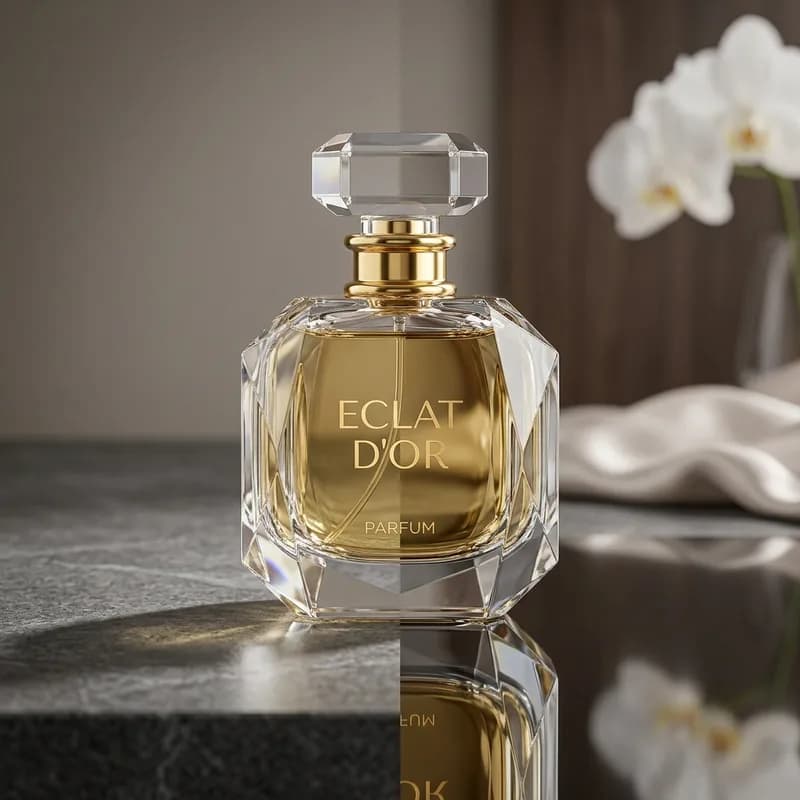
A product floating on a plain white background looks fake. The eye knows something is missing — and what's missing is a shadow. Shadows anchor products to a surface, signal weight and material, and make images feel trustworthy. But not every shadow is the same. Drop shadow, reflection shadow, and natural shadow each communicate something different, and choosing the wrong one for your product or platform can quietly undermine conversions even when everything else in the image looks right.
Why Shadows Matter for Product Photos
Humans read depth and weight through shadows. When a product image has no shadow at all, the object appears to float — and floating objects trigger a subtle visual distrust. The brain expects mass to cast a shadow, and when it doesn't, the image reads as "edited" or "fake," even if the viewer can't articulate why.
The right shadow does four things for a product image: it grounds the product on a surface, reinforces the sense of material weight, adds dimensionality to an otherwise flat composition, and — for luxury products — communicates premium production value. The wrong shadow does the opposite: a badly executed drop shadow makes a $400 perfume bottle look like clip art.
Which type to use depends on three variables: the product category, the platform where the image will live, and the visual language you're trying to speak.
Drop Shadow
A drop shadow is a synthetic shadow created in post-production — typically in Photoshop — that simulates the shadow a product would cast if it were sitting under a directional light source. It appears beneath and slightly offset from the product, giving the impression that the object is resting on a surface.
Drop shadows are constructed by duplicating the product layer, filling it with black, applying Gaussian blur, reducing opacity, and offsetting the layer relative to the product. Typical settings for e-commerce product shots:
- Opacity: 40–60% — enough to read as a shadow without looking heavy
- Blur (Gaussian): 15–25px — soft enough to feel natural, sharp enough to be intentional
- Angle: 120° — the standard convention that reads as overhead-left lighting, consistent with most studio setups
- Distance: 5–15px offset depending on the product's apparent "height" off the surface
Drop shadows work best for packshots, electronics, shoes, flat-lay objects, books, and hard-edge goods. They read clean, professional, and platform-neutral on white backgrounds.
Amazon main images: Drop shadows are explicitly prohibited on main images in most categories. Amazon's image guidelines require a pure white background (RGB 255, 255, 255) with no added graphic elements — and a synthetic drop shadow is classified as a graphic element. Using a drop shadow on an Amazon main image risks suppression. Secondary images on Amazon are less restricted.
Reflection Shadow (Mirror Shadow)
A reflection shadow — sometimes called a mirror shadow — is a downward reflection of the product itself, faded and compressed beneath it to create the impression that the product is sitting on a polished, reflective surface. Unlike a drop shadow, which is a blurred dark shape, a reflection shadow is a recognisable (if ghostly) inverted copy of the product.
To create a reflection shadow in Photoshop: duplicate the product layer, flip it vertically, position it directly below the product, reduce the layer opacity to 20–35%, and apply a gradient mask that fades the reflection from the top (near the product base) to transparent at the bottom. The result is a mirror-like surface beneath the product.
Reflection shadows communicate luxury. They suggest a studio-quality shoot on a glass or lacquered surface — the visual language of high-end fragrance advertising, jewellery catalogues, and watch brand editorial. They work best for:
- Perfume and fragrance bottles — the reflection adds visual weight and prestige
- Cosmetics and skincare — glass and metallic packaging reflects beautifully
- Watches and fine jewellery — the mirror effect amplifies perceived value
- Premium electronics — phones, headphones, and audio equipment benefit from the clean, aspirational feel
Avoid reflection shadows on organic, food-adjacent, or rustic products — the glossy-surface implication conflicts with the natural or handcrafted visual language those products require.
Natural Shadow
A natural shadow is the actual shadow cast by the product during the original photo shoot — the real shadow created by the studio lights, captured in-camera. In post-production, natural shadows are retained and cleaned up rather than created from scratch.
The challenge with natural shadows is background removal. Most background removal workflows — clipping paths, AI tools, layer masking — remove the background along with everything on it, including the shadow. Retaining a natural shadow requires a deliberate multi-layer technique: isolate the product, isolate the shadow separately using a luminosity-based selection or alpha channel extraction, then composite them back together on the new background. When done correctly, the result is indistinguishable from the original shot but with a clean white or transparent background behind it.
Natural shadows are ideal for:
- Lifestyle and editorial shots — where the image is meant to feel like a real scene rather than a studio packshot
- Organic and food-adjacent products — natural shadows reinforce the authenticity cues these categories depend on
- Handcrafted and artisan goods — the shadow's real-world imperfection signals genuineness
- Products shot on textured surfaces — wood, linen, concrete — where a synthetic shadow would look incongruous
Natural shadows require more skill to retain cleanly than drop shadows require to create. The extraction has to preserve the shadow's soft outer edge, its gradient from dark to transparent, and any colour cast the original lighting introduced — without letting any of the original background leak into the retained shadow.
Which Shadow Type by Platform
Platform requirements and audience expectations vary significantly. Here's what each major platform calls for:
- Amazon (main image): No synthetic shadows permitted. Background must be pure white (RGB 255,255,255). Natural shadows that are very faint are sometimes tolerated but technically non-compliant in strict categories. Secondary and lifestyle images have more latitude.
- eBay: Shadows of all types are allowed. Drop shadows are common and widely used by professional eBay sellers. No restriction on synthetic shadow styles.
- Shopify / own website: Full creative freedom. Any shadow type works. Reflection shadows perform particularly well for premium and lifestyle brands. Natural shadows work well for editorial-style product pages.
- Instagram / social media: Reflection shadows and natural shadows outperform drop shadows in engagement. The feed context rewards images that look editorial and real rather than packshot-flat. Drop shadows can read as dated in a social feed.
- Etsy: Natural shadows are strongly preferred. Etsy's audience responds to authentic, handcrafted cues — a natural shadow signals a real studio shoot. Reflection shadows can work for jewellery. Drop shadows tend to feel out of place.
- Google Shopping: Similar to Amazon: clean white background required for main images, no heavy graphic elements. Very faint natural shadows are usually acceptable.
Which Shadow Type by Product
- Shoes and footwear — Drop shadow. Hard edges, clear silhouettes, and the standard packshot format all suit drop shadow. It's the industry default for footwear on white.
- Perfume and fragrance — Reflection shadow. The glossy bottle and the premium positioning make mirror shadow the natural choice.
- Cosmetics and skincare — Reflection shadow for glass and metallic packaging; drop shadow for tubes and simple packaging.
- Watches and jewellery — Reflection shadow for watches; combination of natural and reflection for jewellery depending on the shoot setup.
- Electronics (phones, earbuds, cameras) — Drop shadow for clean packshots; reflection shadow for premium lifestyle hero images.
- Organic products, supplements, wellness — Natural shadow. The authenticity signal is critical for this category.
- Food and food-adjacent products — Natural shadow. The real-environment feel is essential. Synthetic shadows on food images undermine appetite appeal.
- Apparel (flat lay) — Drop shadow or no shadow. Ghost mannequin images typically use no shadow; flat-lay apparel benefits from a light drop shadow to separate from the background.
- Books, packaging, stationery — Drop shadow. Standard packshot format, clear hard edges.
- Handcrafted and artisan goods — Natural shadow. The imperfection of a real shadow reinforces handmade authenticity.
Cost and Turnaround
Shadow addition is one of the most underutilised post-production steps in e-commerce photography. Many sellers either skip shadows entirely or use automated tools that produce obviously synthetic results. Professionally executed shadows — whether drop, reflection, or natural — are one of the highest-return edits available for a product image.
BLACKFOX DIGITAL adds drop shadows, reflection shadows, and natural shadow retention from $0.35/image, with 24-hour turnaround on standard batches and manual execution on every file. Shadow addition is available as a standalone service or bundled with background removal, colour correction, and retouching. Choosing the correct shadow type for your product category and target platform is one of the highest-leverage decisions in product post-production — the difference between a listing that reads as polished and one that looks flat regardless of how good the photography is. That judgment call is built into every image we process.
Explore our ecommerce photo editing service or submit a sample batch via our free trial and receive a no-obligation quality preview before committing to a full order.
