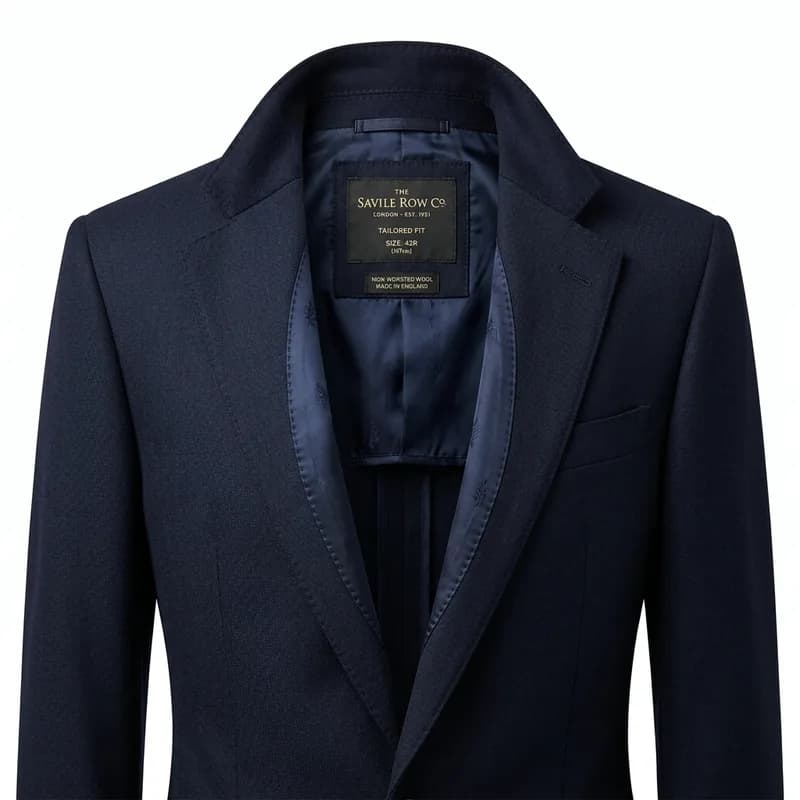
The ghost mannequin effect — also called the invisible mannequin or hollow man effect — produces garment photographs that appear to be worn by an invisible figure. The garment holds its shape in three dimensions, showing the collar, chest, and internal structure that a flat lay simply can't replicate, without the cost and scheduling complexity of a live model.
It's the standard presentation format for mid-market and premium apparel brands on Amazon, ASOS, Zalando, and most fashion marketplaces. Done properly, it's indistinguishable from live model photography in a thumbnail — and the thumbnail is what actually drives clicks.
The Two-Shot Method
Professional ghost mannequin work requires a minimum of two photographs per garment:
Shot 1 — Front on mannequin: The garment is placed on a physical mannequin (typically a black, matte torso form) and photographed from the front. Black mannequin = maximum contrast for background removal. Camera height and focal length stay fixed across all garments in the shoot.
Shot 2 — Interior/label shot: The garment comes off the mannequin, folded or turned to expose the collar, neckline, or interior structure, and photographed from the same position. This is the shot that gets "filled in" during post-processing to complete the 3D illusion.
For more complex garments — hoodies with drawstrings, blazers with lapels, structured outerwear — you'll need additional side or 45-degree shots to give the editor enough reference material for a clean composite.
Choosing the Right Mannequin
The mannequin you shoot on has a direct impact on how clean the edit will be.
- Black matte torso forms are the professional standard. Black creates sharp contrast with light garments, making background removal significantly easier and reducing edge contamination on thin fabrics like chiffon and silk.
- White or grey mannequins cause problems with pale garments — the mannequin bleeds into the fabric at the edges, creating halos that require extensive manual correction.
- Inflatable mannequins are cost-effective but produce visible seam lines at the joints that must be retouched out. For volume production this adds time and cost per image.
- Adjustable torso forms allow you to change shoulder width and chest depth for different garment types, but every adjustment must be locked before shooting — inconsistent mannequin positioning is one of the main causes of symmetry problems in finished edits.
For most brands shooting fashion apparel, a quality fiberglass black torso form is the right investment. The quality of the mannequin directly limits the quality of the final edit.
Camera and Lighting Setup
Ghost mannequin photography requires precise, repeatable lighting. Unlike lifestyle photography where varied light adds character, ghost mannequin editing depends on even, controlled illumination to produce consistent results across a full collection.
Lighting: A two-light strobe setup is the baseline — one main light at roughly 45 degrees and a fill light on the opposite side to reduce harsh shadows. A third light aimed at the background ensures the backdrop reads as pure white at the point of capture, cutting post-processing work significantly. Continuous LED panels are less suitable here; their colour rendering is softer and less consistent shot-to-shot compared to strobe.
Camera settings: Shoot in RAW, at a fixed aperture (f/8–f/11 is typical) to ensure consistent depth of field across all garments. ISO 100. Shutter speed synced to strobe. These settings never change mid-collection — any adjustment creates inconsistency that shows in the final product grid.
Tethered shooting: For any collection of more than 20 pieces, connect your camera directly to a laptop (via USB or Wi-Fi tethering using Capture One or Lightroom). Images appear on the laptop at full resolution immediately after capture, allowing you to review background evenness, mannequin positioning, and garment hang in real time — not after the shoot is complete. Catching a problem during the shoot costs five minutes. Catching it after costs an entire reshoot.
Background: A properly lit white seamless paper background is preferable to a white wall. The paper can be replaced when it marks. Distance between the garment and the background matters: too close and background shadows make clean removal harder; too far and studio depth eats into your frame.
The Editing Process
Step 1 — Background Removal
Both shots are background-removed using hand-drawn clipping paths. The mannequin is removed from Shot 1. The background is removed from the interior shot. Both are exported as transparent PNG layers. AI background removal tools are not suitable at this stage — they cannot reliably handle the edge cases created by transparent fabrics, fine textures, or the mannequin-fabric boundary.
Step 2 — Neck Joint Construction
The neck joint is where the skill shows. The interior neckline from Shot 2 is placed behind the front garment from Shot 1 and aligned precisely. The collar must sit naturally above the interior neckline — no overlap artifacts, no visible gap, no color mismatch between shots.
This is done manually, layer by layer — clipping masks, level adjustments to match exposures, and in some cases frequency separation to match fabric texture between the two shots.
Step 3 — Symmetry Correction
Most garments sit asymmetrically on a mannequin — one shoulder slightly higher, one lapel curling differently. Symmetry correction via liquify and warp tools ensures the final composite looks like it's worn by a proportioned invisible figure, not a plastic form with its own structural quirks.
Step 4 — Final Output
Transparent PNG at the client's required resolution — typically 2000px square for marketplace use — with the garment centered at 90–95% fill, white space evenly distributed, background at pure white (RGB 255/255/255) for marketplace compliance.
Common Ghost Mannequin Mistakes
Visible Mannequin Seams
If the mannequin isn't fully removed, or the neck joint composite has misaligned edges, you'll see a hard line where the interior shot meets the front shot. It looks like a collar floating slightly above the garment body — obvious at full resolution, even if it passes a quick mobile preview check.
Color Mismatch Between Shots
If Shot 1 and Shot 2 were taken at different times or with different flash settings, the fabric color shifts between them. The neck joint then shows a two-tone garment — front body in one color temperature, interior collar in another. Shooting both shots in a single session, with flash power locked, eliminates this problem before it starts.
Flat Collar Syndrome
When the interior shot is just pasted behind the front garment without any 3D perspective correction, the collar looks flat — a magazine cut-out, not a real garment opening. The fix is adding depth cues: slight darkening at the collar interior to suggest shadow, a subtle gradient from collar edge to center, and a soft drop shadow at the opening to give the appearance of depth.
Over-Retouched Fabric
Aggressive smoothing and wrinkle removal can make fabric look plastic rather than textile. Retain the natural grain and texture of the material — the goal is a well-pressed, professionally photographed garment, not a CGI render. This is especially important for premium fabrics like wool, linen, and textured knitwear where material character is part of the product's value.
Ghost Mannequin vs Flat Lay
Both presentation formats have their place. The decision depends on garment type, platform requirements, and budget.
Ghost mannequin advantages: Shows the 3D structure of the garment, communicates fit and volume, and matches the expected main image format on most fashion marketplaces. For structured garments — blazers, shirts, knitwear, outerwear — ghost mannequin consistently outperforms flat lay in click-through rate testing because it more accurately represents how the garment will look when worn.
Flat lay advantages: Lower production cost per image, faster turnaround, and works better for accessories, fabric samples, and categories like homeware or childrenswear where context matters more than 3D presentation.
The practical split for most mid-market apparel brands: ghost mannequin for all structured pieces as the main image, flat lay for secondary shots showing fabric detail, labels, and care information.
Platform Compliance Requirements
- Amazon: Main image must be on pure white background (RGB 255/255/255), product must fill at least 85% of the frame. Ghost mannequin is fully accepted for apparel main images.
- Zalando: Prefers ghost mannequin or live model for all apparel main images. Flat lay is not accepted as a main image in clothing categories. Minimum 762×1100px.
- ASOS: Strict ghost mannequin guidelines with specific centring and fill requirements. Images with visible mannequin seams or incorrect fill percentages are rejected automatically.
When Ghost Mannequin Isn't the Right Call
Ghost mannequin works best for structured garments — blazers, shirts, dresses, outerwear, knitwear. It's the wrong choice for:
- Very flimsy fabrics (pure chiffon, tissue-weight jersey) that collapse without a body — these need a live model, or heavy pinning that creates its own post-processing problems
- Swimwear and lingerie — category norms on most platforms still favor live model photography; ghost mannequin reads as low-effort here
- Accessories — bags, shoes, and jewelry follow product photography conventions, not garment conventions
For those categories, flat lay or live model photography is still the standard — and trying to force ghost mannequin usually shows.
AI Ghost Mannequin Tools: What They Can and Can't Do
Several AI tools (including dedicated apps like Photta and general AI background replacement features in Canva and Adobe) now claim to produce ghost mannequin effects from a single photograph. The practical reality in 2025–2026:
- What works: AI ghost mannequin tools handle simple t-shirts, basic crew-neck sweatshirts, and flat-front trousers reasonably well when the garment has clean edges and no complex interior structure to fill in.
- What doesn't work: Collared shirts, blazers, outerwear, hoodies with drawstrings, or any garment where the neck opening reveals an interior that needs to look natural. AI tools either generate hallucinated collar detail or fill the neck opening with a blurred approximation that's immediately recognizable as AI-generated.
- The audit risk: Marketplaces including Amazon and Zalando are beginning to flag AI-generated main images that misrepresent product structure. A blazer with an AI-hallucinated collar that doesn't match the actual garment violates product representation rules.
AI ghost mannequin tools can accelerate internal proofing and rough catalog previews. They're not a reliable substitute for the two-shot composite method on any garment that will appear as a marketplace main image.
What to Look for in a Ghost Mannequin Editing Service
For brands processing more than a handful of SKUs per season, outsourcing post-production is typically more cost-effective than building an in-house editing capability. Key criteria:
- Manual clipping paths, not AI. Background removal for ghost mannequin composites requires precision at the mannequin-fabric boundary that automated tools still can't match reliably.
- Style guide compliance. The service should match your existing style guide — or help you build one — so every image is consistent across a full collection.
- 24-hour turnaround. This is achievable and is the benchmark for professional services. Season collections require an agreed production schedule.
- Platform-specific output. Confirm the service understands the export requirements of your target marketplaces before placing a season-level order.
Our ghost mannequin service covers all garment types with 24-hour delivery, manual clipping paths on every image, and output formatted to Amazon, Zalando, ASOS, and any platform-specific specification. Send us 5 garments free to see turnaround and quality before committing.