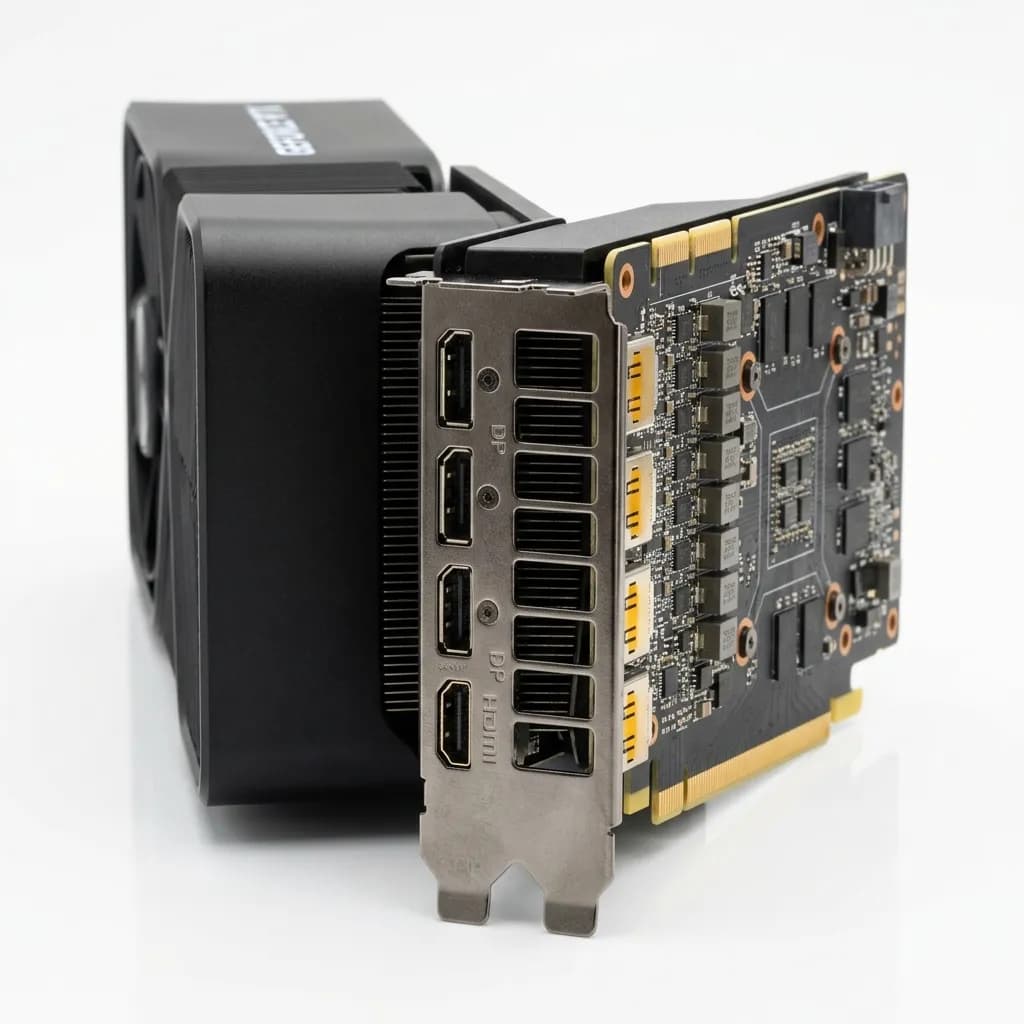
Newegg's buyer base is more technical than most marketplaces — shoppers comparing GPUs, motherboards, and components scrutinize port layouts and build quality before adding to cart. Here's the full image spec and the detail-shot conventions that matter specifically for electronics.
Newegg's audience skews toward technically informed buyers comparing specifications line by line, and its image requirements reflect a marketplace built around components and electronics rather than general consumer goods. A clean white-background hero image gets a listing approved, but it's the detail shots — port layouts, connector types, package contents — that actually move a technical buyer from comparison to purchase. This guide covers Newegg's technical image spec for 2026 and the electronics-specific conventions that general marketplace experience doesn't automatically prepare a seller for.
Main Image Requirements
Background
- Background must be pure white, consistent with standard marketplace conventions.
- No shadows, reflections, or props in the primary image slot — reflections are a particular risk on glossy electronics casings and need to be controlled at the lighting stage, not fixed after the fact.
- No packaging, boxes, or manuals visible in the main image — the product itself must be the sole subject.
Dimensions and File Specifications
- Minimum resolution: 1000×1000px.
- Recommended: 1600px or larger on the longest side — electronics buyers zoom in on port labeling and build materials more than buyers in most other categories, so resolution shortfalls are more visible here than on a simple apparel or home goods listing.
- Format: JPEG or PNG accepted; JPEG preferred for file size efficiency.
- Maximum file size: 10MB per image, more generous than several general marketplaces.
Port and Connector Detail Shots
This is the single most category-specific requirement on Newegg. For any product with I/O ports, connectors, or physical interfaces — graphics cards, motherboards, monitors, networking equipment — a dedicated detail shot of the port layout is expected, not optional. A technical buyer comparing two similar graphics cards is often deciding based on whether a card has the specific port configuration (HDMI count, DisplayPort version, power connector type) their build requires, and a listing without a clear port-layout image loses that comparison by default regardless of the product's actual specs.
- Shoot port/connector detail shots straight-on with even lighting — angled shots that obscure port spacing or labeling undermine the exact purpose of the image.
- Label callouts on detail images (when permitted in the additional-image slots) significantly reduce pre-purchase support questions about compatibility.
- For components with connectors on multiple sides (most motherboards, many graphics cards), a full set covering every side with ports is standard practice, not an enhancement.
Package Contents Imagery
Electronics buyers on Newegg frequently want to confirm exactly what ships in the box before purchasing — cables, mounting hardware, documentation, and included accessories vary significantly between otherwise similar products. A package-contents image, showing every included item laid out clearly against a clean background, is one of the more effective secondary images for reducing "missing item" disputes and return requests driven by mismatched expectations rather than actual product defects.
Certified Refurbished and Open Box Listings
Newegg's certified refurbished and open-box programs carry their own image expectations distinct from new-condition listings. Refurbished listings benefit from images that honestly represent cosmetic condition where relevant (a graphics card's actual physical condition, not a stock manufacturer photo), since buyers in this category are specifically choosing a discount in exchange for accepting some condition variance — an image set that looks identical to a new-condition listing can create a mismatch between expectation and delivery that drives returns even when the product itself performs correctly.
Common Rejection Reasons
- Missing port or connector detail shots on products where I/O configuration is a purchase-critical spec.
- Reflections on glossy plastic or metal casings that read as background inconsistency during automated review.
- Stock manufacturer images used for refurbished or open-box listings that don't reflect actual unit condition.
- Low-resolution images that fail at zoom when buyers inspect port labeling or build quality closely.
Preparing Images for Newegg at Scale
- Budget a dedicated port/connector detail pass for every SKU with physical interfaces, rather than relying on the manufacturer's stock photography, which often shows a generic reference unit rather than the exact SKU variant being sold.
- Control reflections at the lighting stage for glossy or metallic casings — diffused, even lighting avoids the retouching workload that comes from trying to remove reflections after the fact.
- Shoot package-contents images as standard content, not an optional extra, especially for products where included accessories vary by SKU or region.
- Photograph actual unit condition for refurbished and open-box listings rather than reusing new-condition stock imagery.
Newegg vs. General Marketplaces: What's Actually Different
Sellers cross-listing electronics from Amazon or a general marketplace often assume the same image set transfers cleanly. In practice, the gap shows up in two places: general marketplaces treat detail shots as conversion-optimization extras, while Newegg's technically literate buyer base treats port and connector imagery as baseline due diligence they expect to find before adding to cart. And general marketplaces rarely distinguish refurbished imagery from new-condition imagery as sharply as Newegg's open-box and certified refurbished programs do — a seller running both channels needs a genuinely separate image pass for refurbished stock, not a relabeled copy of the new-condition set.
Component, Peripheral, and Finished-System Priorities
Not every product on Newegg carries the same photography demands. Internal components (graphics cards, motherboards, RAM, storage) live or die on the port and connector detail work already covered, since buyers are checking physical compatibility with an existing build. Peripherals — keyboards, mice, monitors, headsets — carry a different priority: ergonomic and design detail matters more here, since buyers are judging comfort and aesthetics as much as specifications, and close-up shots of key texture, cable braiding, or monitor bezel thickness do real conversion work that a pure spec sheet can't. Pre-built systems and finished PCs sit at the far end of the spectrum: buyers want interior shots showing cable management and component layout, not just an exterior case photo, since build quality inside the case is a significant driver of both trust and post-purchase satisfaction for a product buyers can't physically inspect before delivery.
Manufacturer Stock Assets vs. Original Photography
Many Newegg sellers, particularly resellers and distributors rather than direct manufacturers, rely heavily on manufacturer-supplied stock photography rather than shooting original images. This works acceptably for the main white-background hero image in most cases, since manufacturer stock photos typically already meet the basic technical spec. Where it breaks down is exactly the detail-shot content that differentiates a strong Newegg listing: manufacturer stock rarely includes the specific port-layout close-ups, package-contents breakdown, or actual-unit condition photography that this guide covers, because those assets are built for general marketing use rather than marketplace-specific compliance and conversion needs. Sellers relying entirely on manufacturer assets are, in practice, leaving the highest-impact images for a technical buyer unaddressed — and those are exactly the images competing sellers with a dedicated photography pass are most likely to have covered.
Warranty and RMA-Relevant Imagery
Electronics carry warranty and return-merchandise-authorization considerations that most product categories don't, and images play a supporting role here that's easy to overlook. A clear shot of serial number or model number placement, without needing to include the actual serial digits, helps buyers confirm they're purchasing the exact SKU variant that matches the manufacturer's warranty terms — a meaningful concern in electronics, where regional variants of the same nominal product sometimes carry different warranty coverage. For sellers handling their own RMA process, a documented "as-received" condition photo standard, applied consistently across every processed return, gives both the seller and Newegg's dispute resolution process a clear reference point if a condition dispute arises later. This is closer to an operational practice than a listing-image requirement, but it grows directly out of the same photography discipline a strong catalog already requires.
Showing Physical Size and Fit
For many Newegg buyers, the question is not only what a product does but whether it will physically fit. A graphics card has to fit the case's length and slot clearance, a CPU cooler has to clear the RAM and the side panel, and a monitor has to fit the desk. Add at least one image that makes size clear:
- A clean diagram-style image with the key dimensions marked, such as length, height and thickness or slot width, in an additional image slot.
- A scale shot next to a familiar object, or installed in a typical case, for components where size is hard to judge from a white-background photo.
Make sure the dimensions in the image match the specification table exactly. Conflicting numbers create more support questions than missing ones.
Photographing RGB-Lit Products
Keyboards, fans, cases and memory with RGB lighting need extra care. Shoot each product twice: once unlit, to show its real colour and finish, and once with the lighting on. Bright LEDs easily blow out to white and lose their colour, so take a darker exposure for the lit areas and blend it with a normal exposure for the body. Choose one simple lighting effect for the main lit image rather than a rainbow of colours, and say in the description that the colours are adjustable, so buyers do not expect the exact effect shown.
A Quick Checklist Before Submitting to Newegg
- Confirm a dedicated port/connector detail shot exists for any product with physical I/O.
- Check for reflections on glossy or metallic surfaces under close inspection, not just a casual glance.
- Verify package-contents imagery accurately reflects what ships with the specific SKU being listed.
- Confirm refurbished and open-box listings use actual-unit photography, not generic manufacturer stock images.
Our e-commerce photo editing service handles white-background compliance and detail-shot preparation for electronics catalogs, including port and connector imagery that meets Newegg's technical buyer expectations. Submit 5 images for a free trial to verify output quality before committing your catalogue.