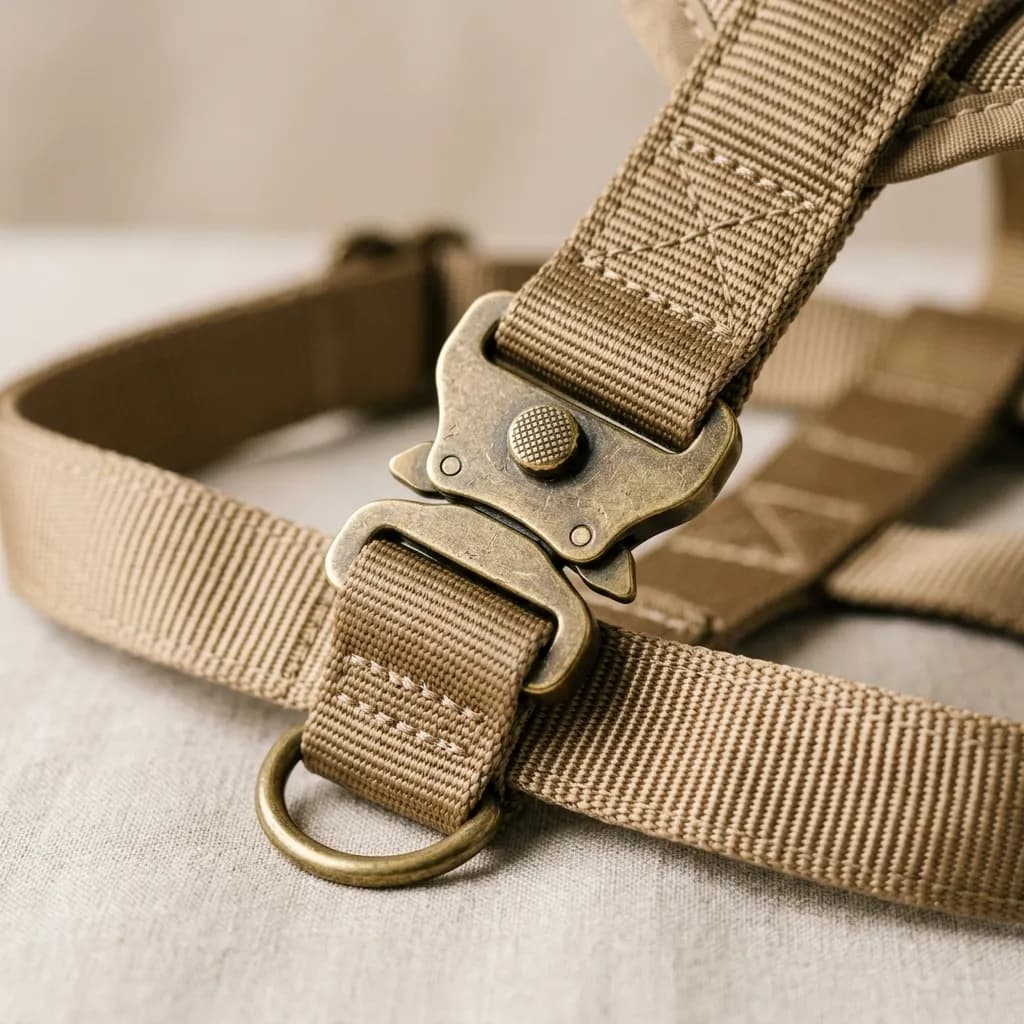
Pet product photography sits at an odd intersection of categories most photo editing guides don't address directly. A dog harness needs the sizing clarity of apparel, a plush toy needs the texture fidelity of a fabric product, and a good chunk of the category's most effective marketing images involve live animals, which introduces variables — fur movement, unpredictable poses, inconsistent lighting on a moving subject — that studio product photography doesn't normally deal with. This guide covers the specific editing considerations for pet product photography and where the category's return-driving mistakes tend to happen.
Sizing Context: The Category's Biggest Return Driver
Pet product returns disproportionately trace back to sizing confusion, since pets don't come in standardized sizes the way human apparel does — a "medium" harness fits very differently on a stocky bulldog versus a lean greyhound. Product-only packshots, while necessary for clean marketplace compliance, don't solve this problem on their own. The images that reduce sizing-related returns most effectively pair a clean product shot with either a size chart overlay showing measurement points, or an in-context shot showing the product on a range of dog sizes and body types. When editing these context shots, keep proportions and scale honest — resist the retouching temptation to make a product look sleeker or smaller on a pet than it actually sits, since this directly inflates the sizing-mismatch return rate it's meant to prevent.
Fur, Fabric, and Texture Retouching
- Plush and fabric pet toys need texture fidelity similar to apparel retouching — over-smoothing fabric grain or fleece texture makes a toy look artificially glossy in a way that doesn't match the physical product on arrival.
- Fur-trimmed or fur-lined pet gear (beds, coats, carriers) requires the same fine-detail masking discipline as fashion fur trim — individual strand definition rather than a smoothed blob, since texture is often the primary visual selling point for comfort-focused products.
- Chew-resistant and rubber materials photograph with specific surface characteristics (matte texture, tooth-mark patterns on some designs) that shouldn't be smoothed away, since customers evaluating durability products specifically look for this kind of surface detail.
Live-Animal Photography: Editing Challenges Unique to the Category
Live-pet product photography introduces variables studio product photography doesn't face: a moving subject means less control over pose, lighting consistency across a shoot varies more because animals don't hold still for careful repositioning, and fur or feather movement can blur fine product detail in ways fabric on a static garment never does. Editing live-animal shots typically requires more selective correction than product-only images — spot color-correcting fur that caught different lighting than the product, cleaning up motion blur on product straps or clasps without softening the animal's natural texture, and balancing exposure between a moving subject and a static product without either one looking artificially isolated from the scene.
Product-Only vs. Lifestyle: When Each Is Worth the Investment
Product-only shots (clean background, no animal) are cheaper to produce consistently, easier to edit to marketplace spec, and necessary for main-image compliance on most channels. Lifestyle shots with live animals cost more to produce and are harder to standardize across a catalog, but they do real work that product-only shots can't: showing scale, demonstrating how a product actually sits or moves on an animal, and building the emotional connection that drives impulse purchases in a category where buying decisions are often driven by a pet owner's affection rather than pure functional comparison. Most pet brands need both — product-only for marketplace compliance and search-result consistency, lifestyle for the brand's own site and marketing, where the emotional and contextual information matters more than clean specification compliance.
Color Accuracy for Multi-Material Products
Pet gear frequently combines multiple materials in one product — a harness with fabric webbing, a metal buckle, and a padded liner in a contrasting color — and each material can shift color differently under the same lighting and editing pass. A uniform color-correction applied across the whole image can leave one material looking accurate while another drifts, particularly with mixed matte and reflective surfaces in the same shot. Check color accuracy against a physical reference for each distinct material in a multi-material product rather than applying a single correction pass and assuming it holds evenly across the whole item.
Background and Scene Considerations for Pet Categories
- Beds and furniture-adjacent products often benefit from a lifestyle scene showing scale relative to a room, similar to how furniture photography uses composite scenes — a pet bed shown floating on pure white gives no useful size reference.
- Toys and small accessories generally work best with clean product-only packshots for marketplace main images, supplemented by scale-reference or in-use secondary images.
- Apparel and gear (harnesses, coats, boots) need the same on-model discipline as human apparel — proper fit demonstration matters more than styling flourish.
Seasonal and Breed-Specific Variant Photography
Pet product lines frequently expand into seasonal variants (winter coats, cooling mats, holiday-themed accessories) and breed-specific sizing that general product photography rarely needs to account for at the same scale. Each seasonal or size variant ideally gets its own consistent photography and editing pass rather than reusing a single hero shot with a swapped color, since fit and drape genuinely differ across breed sizes in ways a simple color-swap edit can't represent honestly. Brands that photograph only their most photogenic size (typically medium, since it works for the widest range of dogs) and rely on that image across all size variants tend to see disproportionate returns from the smallest and largest size options, where the actual fit deviates most from what's shown.
Working With Pet Photography Vendors and Rescue Partnerships
Many pet brands source product photography through shelter or rescue partnerships, using adoptable or foster animals as models — a practice with real marketing and goodwill value, but one that introduces its own editing considerations. These sessions typically produce less controlled results than a dedicated pet-model shoot, since the priority is the animal's welfare and comfort over perfect studio conditions, and editors need to work with more variable source material as a result. Brief any editing vendor on this context explicitly so retouching decisions account for it — over-correcting a rescue photo shoot's inherent variability into something that looks like a polished commercial studio session can undercut the authenticity that made the partnership valuable in the first place.
Common Pet Product Photo Editing Mistakes
- Retouching a product to look smaller or sleeker than it actually is on a pet, which directly drives the sizing-related returns this category already struggles with.
- Over-smoothing fur trim or plush texture into a flat, glossy surface that doesn't match the physical product.
- Inconsistent color correction across multi-material products, leaving fabric, metal, or plastic components looking mismatched.
- Relying only on product-only shots for a category where scale and fit context significantly reduce return rates.
- Losing fine product detail to motion blur in live-animal shots without a targeted correction pass.
Pet Food, Treats and Supplements
Consumables follow different rules from gear and toys. Owners are often switching from a food their pet already eats, so they look closely at what they are buying:
- Make every label readable. Photograph the front of pack, the ingredient list and the feeding guide or analysis panel as separate, sharp images. Pet food labelling rules vary by country, and buyers expect to read this information before ordering.
- Show the actual product. A close-up of the kibble, treat or chew next to a coin or a hand shows its real size and texture, which matters to owners of very small or very large dogs.
- Keep food edits honest. Cleaning up crumbs and dust is fine; changing the colour or shape of the food itself is not. If the delivered product looks different, owners notice immediately.
- Keep flavour variants consistent. Photograph every flavour and bag size with the same angle and lighting so the range reads clearly side by side.
Planning a Live-Animal Shoot So Editing Is Easier
A little planning before the shoot saves hours of retouching afterwards:
- Use a fast shutter speed and burst mode. Animals move constantly, and a fast shutter freezes buckles, tags and stitching that would otherwise blur.
- Bring a handler. One person keeps the animal's attention with treats or a toy while the photographer concentrates on framing and focus.
- Keep sessions short. Animals tire quickly, and calm, relaxed animals look better on camera than stressed ones.
- Fix the lighting before the animal arrives. Consistent light across the whole session makes colour correction far simpler.
- Shoot the product alone in the same setup. A product-only frame gives the editor an accurate colour and detail reference for every live-animal shot.
- Remove pet hair from products between shots. A lint roller costs seconds; removing hair digitally from dark fabric takes much longer.
A Checklist for Pet Product Photo Editing
- Verify sizing context is honest — no artificial slimming or scaling of product-on-pet images.
- Preserve fur, fleece, and fabric texture fidelity rather than smoothing it into a generic surface.
- Check color accuracy per material on multi-material products, not just once for the whole image.
- Pair product-only marketplace shots with at least one scale-reference or in-context image.
- Clean up motion blur on product details in live-animal shots without over-smoothing the animal itself.
Our e-commerce photo editing service handles the texture fidelity and multi-material color accuracy pet product photography demands. Submit a free sample batch to see how we handle your catalog.
